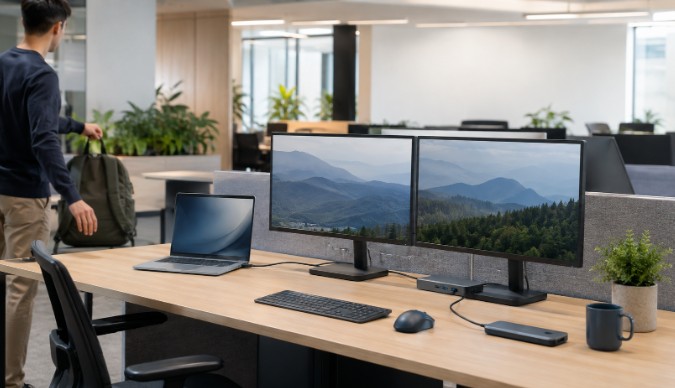
Hybrid work has changed the meaning of an office desk. For many employees, a desk is no longer personal territory occupied five days a week. It is a temporary station used for a few hours, then handed to someone else. This model can reduce unused space and give teams more flexibility, but only when the shared workstation is genuinely easy to use.
Poorly planned hot desking transfers the cost of flexibility to employees. Every arrival becomes a search for cables, adapters, passwords, and missing peripherals. A successful shared office must make the unfamiliar desk feel predictable.
Standardize the Experience, Not Every Device
Teams often use a mixture of laptops, operating systems, screen sizes, and job-specific tools. Trying to make all hardware identical may be expensive or unrealistic. A better goal is to standardize the experience employees receive at the desk.
Each station should answer the same questions: Where does the laptop connect? How is it charged? Which display is primary? Where are the keyboard and mouse? How does the employee report a problem? Consistency lowers the mental cost of moving between seats.
Clear labels help, especially when they describe function rather than technical jargon. “Connect laptop here” is more useful to many employees than a small symbol beside an unfamiliar port.
Make One Connection Do the Heavy Lifting
At a well-equipped station, a compatible laptop docking station can bring displays, power, network access, and desk peripherals into a single connection workflow. This does not remove the need for compatibility planning, but it reduces the number of loose components employees must understand.
The organization should test docks with the actual laptops in circulation. Connector shape alone does not guarantee support for a particular display arrangement, charging level, or data feature. Testing common configurations before deployment is far more efficient than solving the same problem desk by desk.
Keep firmware, drivers, and setup guidance under change control. Shared hardware becomes difficult to manage when each location has a different history of informal fixes.
Provide a Simple Option for Lighter Work
Not every shared seat needs to support multiple monitors and every possible peripheral. Some spaces are intended for short visits, quiet reading, or informal collaboration. These stations may benefit from a smaller connection kit built around a USB C Hub with the specific ports people use most often.
Matching equipment to the purpose of the space controls cost and reduces clutter. A presentation room might prioritize HDMI and reliable power. A project table may need data transfer and charging. A quiet-focus area may require only a display, keyboard, and mouse.
Creating a few clear station types is usually easier to support than making every desk capable of everything.
Design for People Who Arrive With No Context
The true test of a shared desk is whether a first-time visitor can use it without asking a nearby colleague. Instructions should be visible, brief, and located where the decision occurs. A small card beside the connection point can show the normal setup, basic troubleshooting, and support contact.
Use physical cues as well. Route the laptop cable to the natural placement area. Keep the spare adapter in a labeled compartment. Mark the correct monitor input. These details reduce the possibility that one employee’s improvised solution becomes the next employee’s mystery.
Accessibility belongs in the standard, not as a later exception. Adjustable screens, reachable ports, suitable seating ranges, and alternatives to small printed instructions can make the same workstation usable by more people.
Treat Cables as Shared Infrastructure
Cables fail because they are bent, pulled, twisted, and removed repeatedly. In a hot-desk environment, they may experience far more handling than cables at assigned desks. Protect them with sensible routing and strain relief, but avoid locking everything into a position that makes replacement difficult.
Create an inspection routine. Staff do not need to examine every cable daily, but visible damage, loose connectors, intermittent displays, and unusually warm components should be reported and addressed. A drawer of untracked replacement adapters is not a support strategy.
It also helps to keep a small, documented pool of approved spares. When equipment is standardized, support staff can replace a failed component quickly and investigate it away from the active desk.
Separate Booking Problems From Hardware Problems
A perfect workstation cannot fix a confusing reservation system, and a good booking app cannot rescue an unreliable desk. Employees need confidence that a reserved station exists, matches its description, and works when they arrive.
Desk records should include meaningful capabilities, such as number of displays, accessibility features, quiet-zone rules, and supported connection type. If a station is awaiting repair, remove it from availability rather than letting several employees rediscover the same fault.
Usage data can guide improvement, but raw occupancy does not explain everything. A frequently empty desk may be undesirable because of noise, lighting, or repeated hardware trouble. Pair usage patterns with employee feedback and service records.
Create an End-of-Session Standard
Shared workstations need a clear reset expectation. Employees should sign out of local accounts, remove personal storage, return adjustable equipment to a neutral position, and leave the connection cable ready for the next person. Cleaning guidance should be specific and supported with appropriate supplies.
The process should take only a minute or two. If resetting requires technical knowledge, the workstation design is too complicated.
Flexibility Depends on Reliability
Hot desking works when people gain choice without losing time. That requires more than buying equipment or reducing the number of desks. It requires a system: tested connections, purposeful station types, visible instructions, maintained cables, accurate booking information, and a simple reset routine.
When those details are handled well, a shared desk stops feeling borrowed. It becomes dependable infrastructure—ready for the next person, device, and project.